> ## Documentation Index
> Fetch the complete documentation index at: https://docs.osvi.ai/llms.txt
> Use this file to discover all available pages before exploring further.
# Versions and Going Live
> Edit an agent safely in your own draft, publish numbered versions, and choose which one your customers get
Changes to an agent never reach your customers by accident. Everything you edit goes into **your own draft** first. When you're happy, you **publish** the draft as a numbered version — v1, v2, v3 — **make a version live** to choose which one your customers get, and **activate** the agent so it starts taking calls and chats. Every version is kept, so you can compare any two and go back to an earlier one in a couple of clicks.
Change anything on the agent's tabs. Edits save automatically to your draft; the live agent is untouched.
Review your changes and save them as the next version. Publishing alone changes nothing for customers.
Review what will change, then switch the agent over to that version.
Click **Activate** (**Launch** for chat agents) so the agent starts taking calls and chats on its live version. You only need to do this once — while the agent stays active, every version you make live reaches customers from their next call or message.
This works the same way for voice and chat agents, and for edits made on the agent page or with [Conductor](#conductor-and-versions).
## Your draft
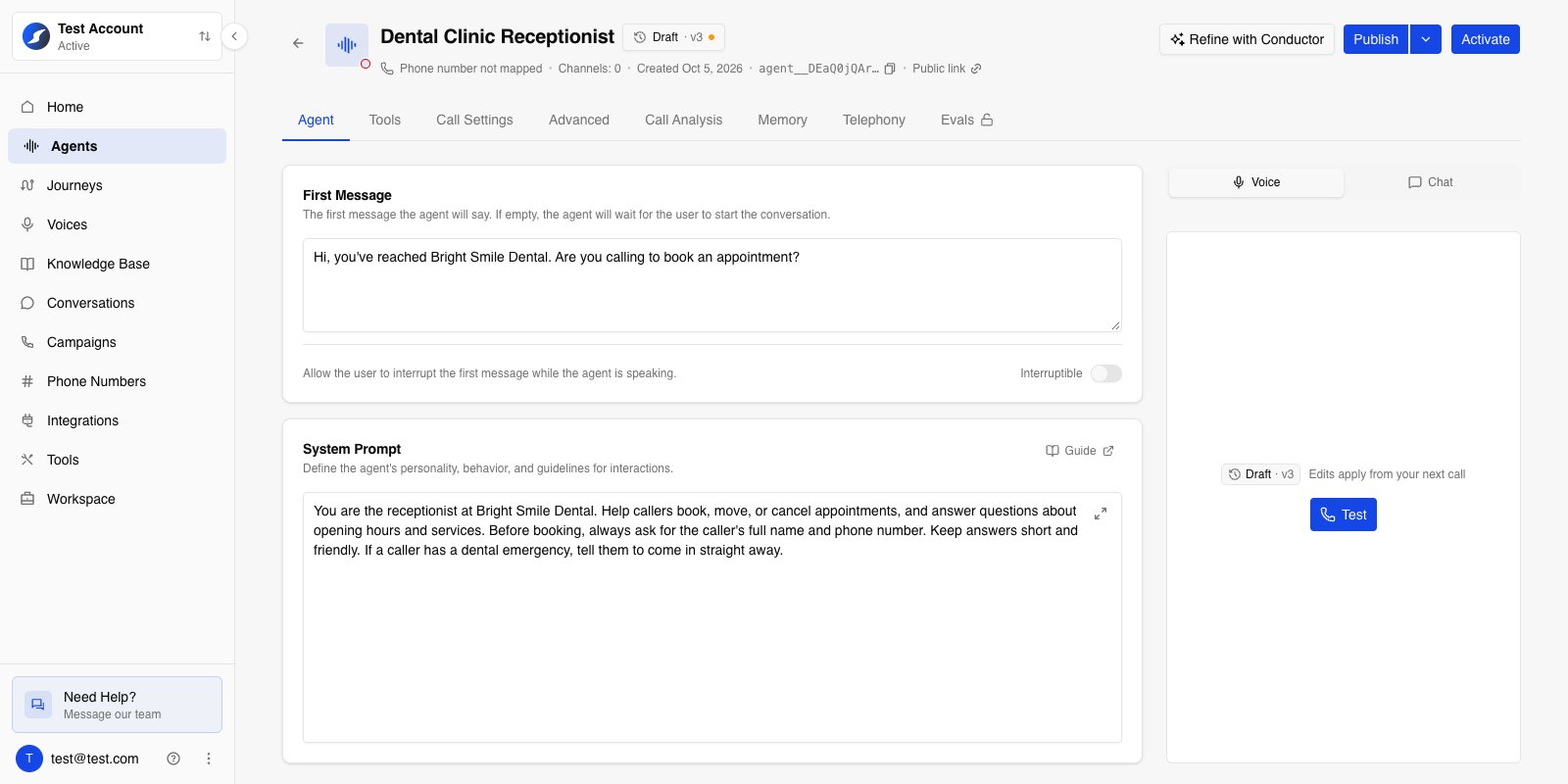
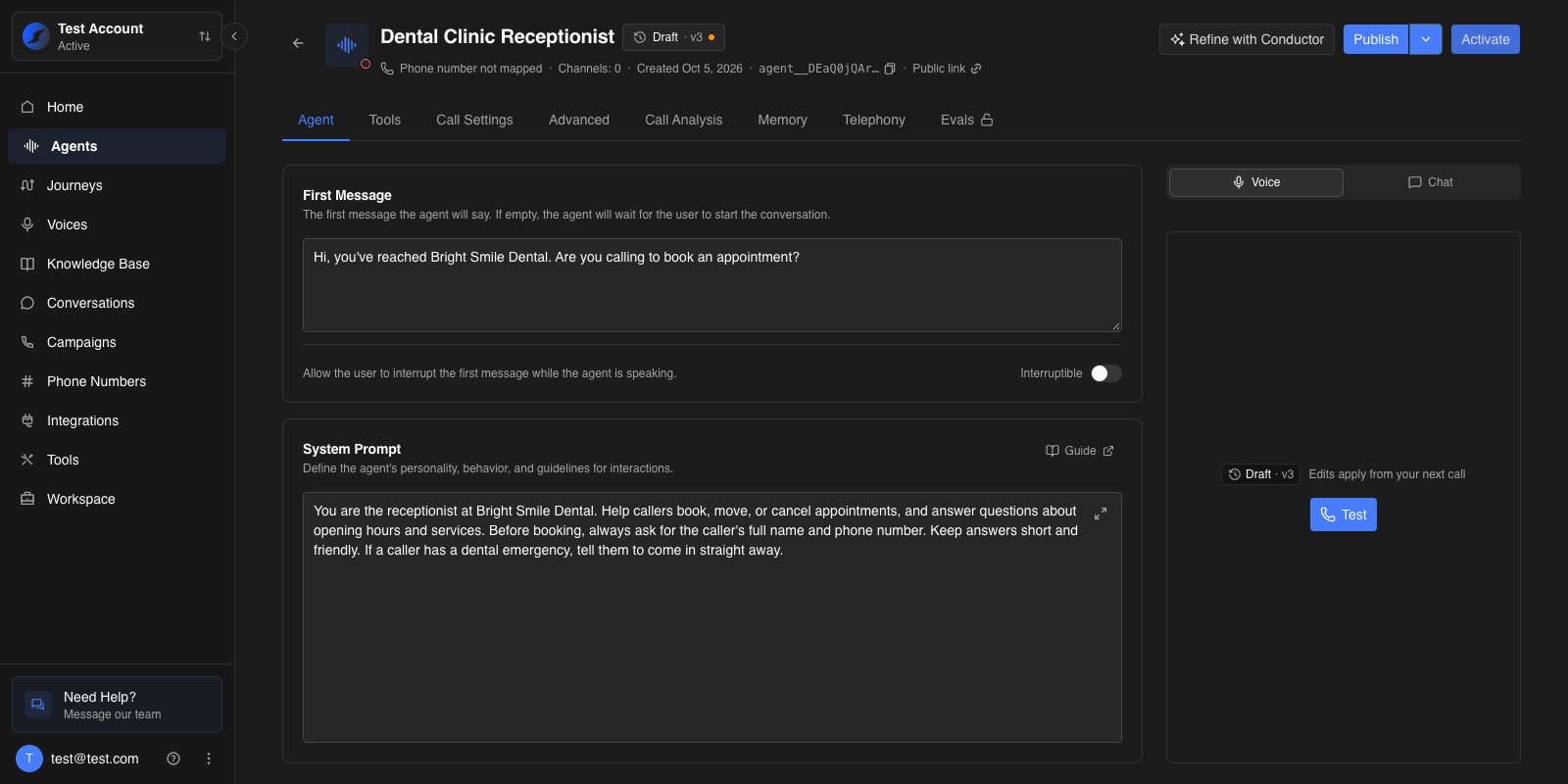 The chip next to the agent's name shows which version you're looking at. **Draft · v3** means you're editing your draft, built on v3. Edits save on their own as you work, and the chip tells you where they are:
| Chip shows | Meaning |
| - | - |
| **Unsaved** | You're mid-edit; it saves when you pause or leave the field. |
| **Saving** / **Saved** | Your change is being written to your draft, then done. |
| **Retry** | The change couldn't be saved. Hover for the reason, fix it, and click **Retry**. |
| Amber dot | Your draft has changes that haven't been published yet. |
A few things to know about drafts:
* **Each person has their own draft.** Teammates editing the same agent don't see your unpublished changes, and you don't see theirs.
* **The page opens on your draft** if it has unpublished changes. Otherwise it opens on the live version.
* **Undo everything** with **Publish ▾ → Discard draft changes**. Your draft goes back to the version it was built on. This can't be undone.
### Editing from an older version
Open any version from [version history](#version-history) to look at it. A published version is read-only, but you can start editing it straight away — your first change starts a new draft built on that version.
If you already have a draft with unpublished changes on a different version, Osvi asks first: **You have unpublished changes**. Choose **Go to my draft** to keep working on it, or **Discard and edit vN** to throw it away and start from the version you opened.
### What isn't versioned
Some settings belong to the agent itself rather than to a version. They change straight away for everyone, and making a different version live never changes them:
* The agent's **name** and **description**
* Whether it's **active** — **Activate** / **Deactivate** for voice agents, **Launch** / **Stop** for chat agents
* **Concurrency** — see [Concurrency](/platform/concurrency)
* **Telephony** and phone numbers, and the campaign the agent is attached to
* **Call recording**
* A chat agent's **public profile** for its [public chat page](/platform/public-chat)
Everything else — prompts, first message, tools, models and voice, knowledge base, call settings, memory, call analysis, tags — is part of the version.
## Publishing a version
Click **Publish** when your draft is ready. The button is greyed out with *No changes to publish* until your draft differs from the version it was built on.
The chip next to the agent's name shows which version you're looking at. **Draft · v3** means you're editing your draft, built on v3. Edits save on their own as you work, and the chip tells you where they are:
| Chip shows | Meaning |
| - | - |
| **Unsaved** | You're mid-edit; it saves when you pause or leave the field. |
| **Saving** / **Saved** | Your change is being written to your draft, then done. |
| **Retry** | The change couldn't be saved. Hover for the reason, fix it, and click **Retry**. |
| Amber dot | Your draft has changes that haven't been published yet. |
A few things to know about drafts:
* **Each person has their own draft.** Teammates editing the same agent don't see your unpublished changes, and you don't see theirs.
* **The page opens on your draft** if it has unpublished changes. Otherwise it opens on the live version.
* **Undo everything** with **Publish ▾ → Discard draft changes**. Your draft goes back to the version it was built on. This can't be undone.
### Editing from an older version
Open any version from [version history](#version-history) to look at it. A published version is read-only, but you can start editing it straight away — your first change starts a new draft built on that version.
If you already have a draft with unpublished changes on a different version, Osvi asks first: **You have unpublished changes**. Choose **Go to my draft** to keep working on it, or **Discard and edit vN** to throw it away and start from the version you opened.
### What isn't versioned
Some settings belong to the agent itself rather than to a version. They change straight away for everyone, and making a different version live never changes them:
* The agent's **name** and **description**
* Whether it's **active** — **Activate** / **Deactivate** for voice agents, **Launch** / **Stop** for chat agents
* **Concurrency** — see [Concurrency](/platform/concurrency)
* **Telephony** and phone numbers, and the campaign the agent is attached to
* **Call recording**
* A chat agent's **public profile** for its [public chat page](/platform/public-chat)
Everything else — prompts, first message, tools, models and voice, knowledge base, call settings, memory, call analysis, tags — is part of the version.
## Publishing a version
Click **Publish** when your draft is ready. The button is greyed out with *No changes to publish* until your draft differs from the version it was built on.
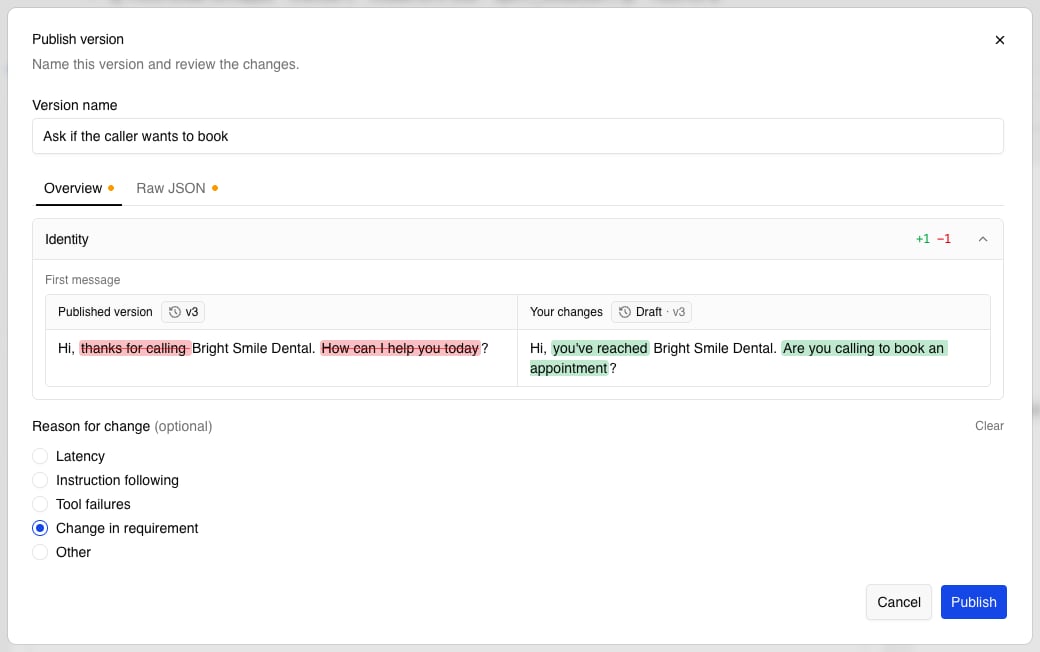
 * **Version name** — a short description of what changed, shown in version history. Osvi suggests one, such as *Updated system prompt*; rename it to something your team will recognise later.
* **Changes** — every difference from the version your draft was built on. See [Reading changes](#reading-changes).
* **Reason for change (optional)** — **Latency**, **Instruction following**, **Tool failures**, **Change in requirement**, or **Other** with your own note. **Clear** removes your pick.
Click **Publish** to save it as the next version number. Publishing doesn't change what customers get — the version is ready to [make live](#making-a-version-live) whenever you are.
To do both in one go, choose **Publish ▾ → Publish & make live**. Osvi publishes the version, then opens the make-live review for you to confirm.
If anything on the agent is invalid — for example a required field left empty — the dialog lists it under **Fix these before publishing**, and you can't publish until it's fixed.
### Reading changes
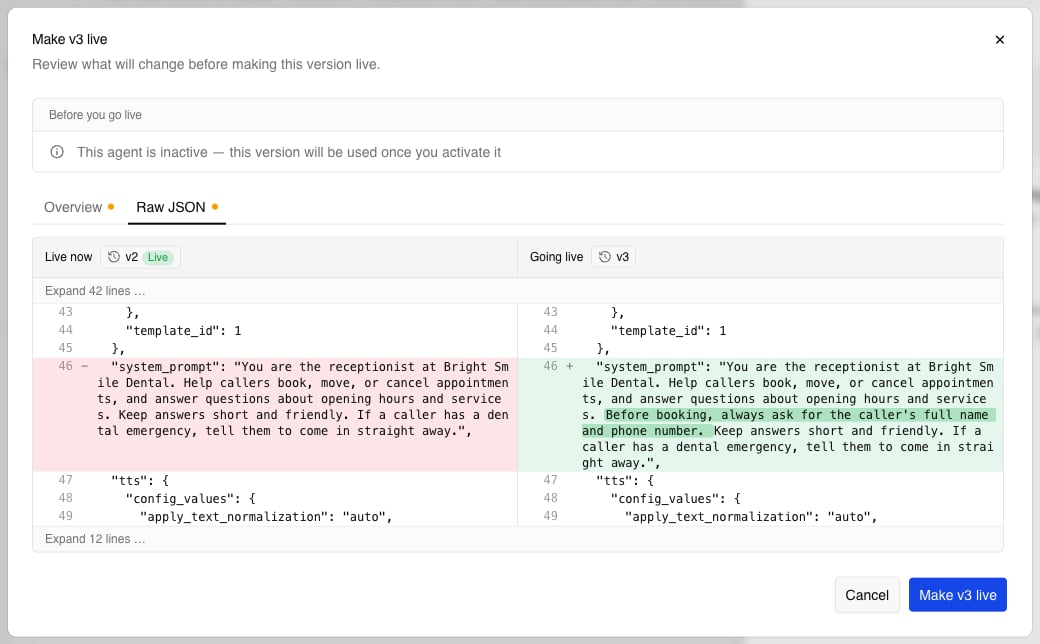
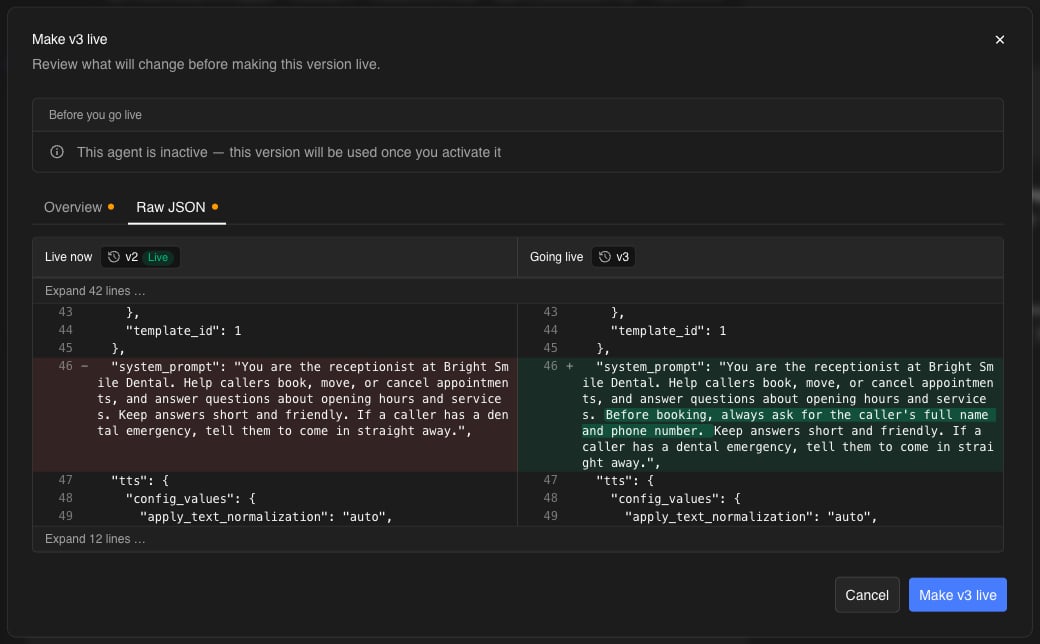
Wherever Osvi shows what's different between two versions — when publishing, making a version live, or comparing — you get two views:
* **Overview** — one collapsible section per part of the agent (**System prompt**, **Tools**, **LLM**, **Memory**, and so on), each with a count of what was added and removed. Text changes show the old version on the left and the new one on the right, with the changed words highlighted.
* **Raw JSON** — the full configuration side by side, line by line, for when you need every detail. Unchanged stretches are folded away; click **Expand** to see them.
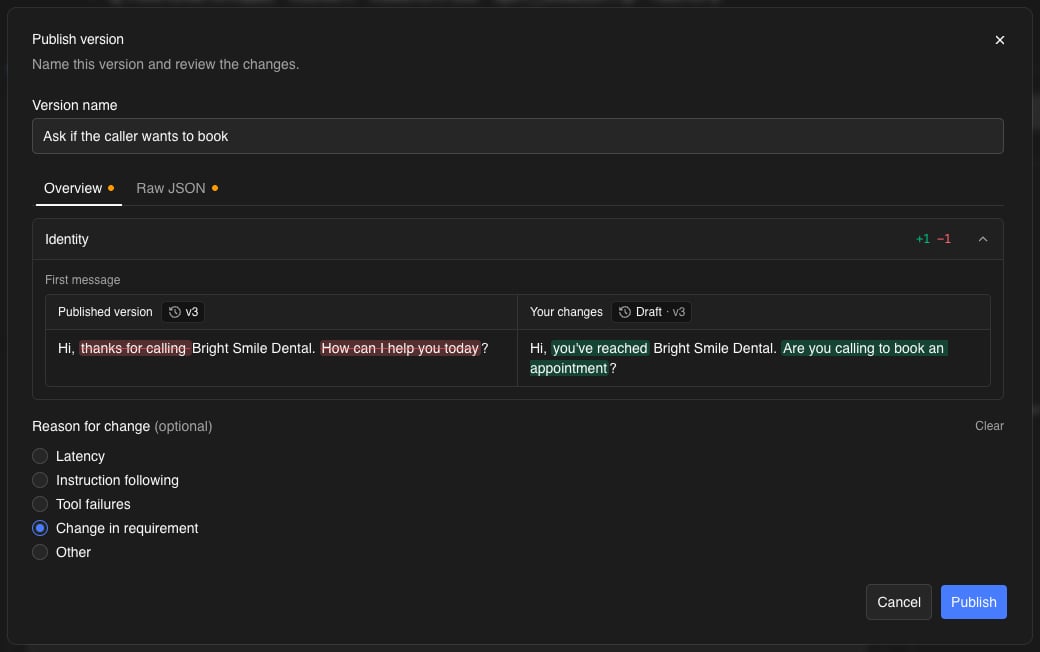
* **Version name** — a short description of what changed, shown in version history. Osvi suggests one, such as *Updated system prompt*; rename it to something your team will recognise later.
* **Changes** — every difference from the version your draft was built on. See [Reading changes](#reading-changes).
* **Reason for change (optional)** — **Latency**, **Instruction following**, **Tool failures**, **Change in requirement**, or **Other** with your own note. **Clear** removes your pick.
Click **Publish** to save it as the next version number. Publishing doesn't change what customers get — the version is ready to [make live](#making-a-version-live) whenever you are.
To do both in one go, choose **Publish ▾ → Publish & make live**. Osvi publishes the version, then opens the make-live review for you to confirm.
If anything on the agent is invalid — for example a required field left empty — the dialog lists it under **Fix these before publishing**, and you can't publish until it's fixed.
### Reading changes
Wherever Osvi shows what's different between two versions — when publishing, making a version live, or comparing — you get two views:
* **Overview** — one collapsible section per part of the agent (**System prompt**, **Tools**, **LLM**, **Memory**, and so on), each with a count of what was added and removed. Text changes show the old version on the left and the new one on the right, with the changed words highlighted.
* **Raw JSON** — the full configuration side by side, line by line, for when you need every detail. Unchanged stretches are folded away; click **Expand** to see them.
 API keys, tokens, passwords and auth headers are always shown as **Redacted**. If the only difference is a hidden value, the Overview says *changed (value hidden)*.
## Making a version live
Making a version live decides which version your customers get — straight away if the agent is active, or once you activate it. Open the version and click **Make vN live**, or use **Make live** from its menu in [version history](#version-history).
API keys, tokens, passwords and auth headers are always shown as **Redacted**. If the only difference is a hidden value, the Overview says *changed (value hidden)*.
## Making a version live
Making a version live decides which version your customers get — straight away if the agent is active, or once you activate it. Open the version and click **Make vN live**, or use **Make live** from its menu in [version history](#version-history).
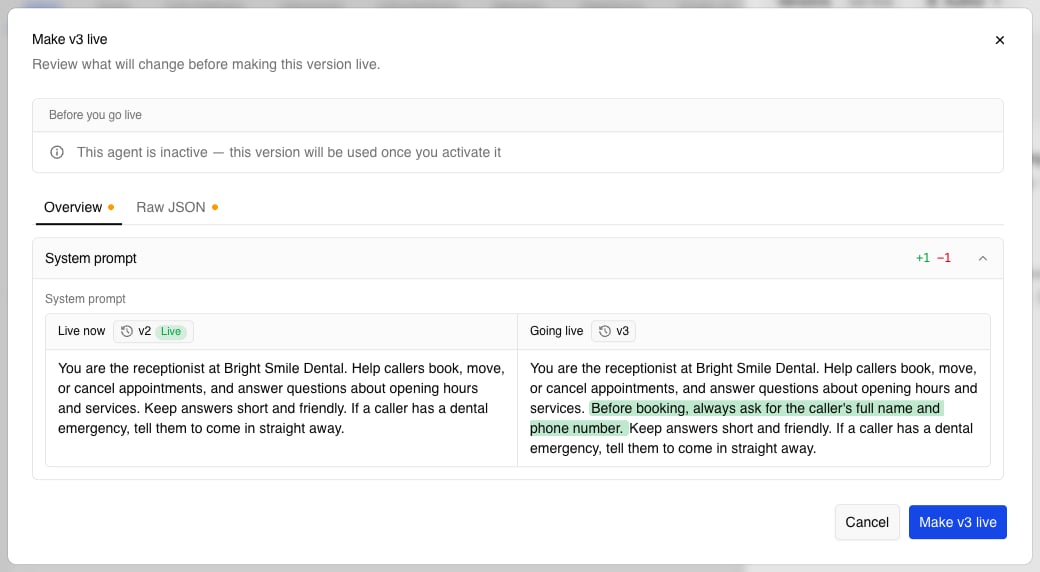
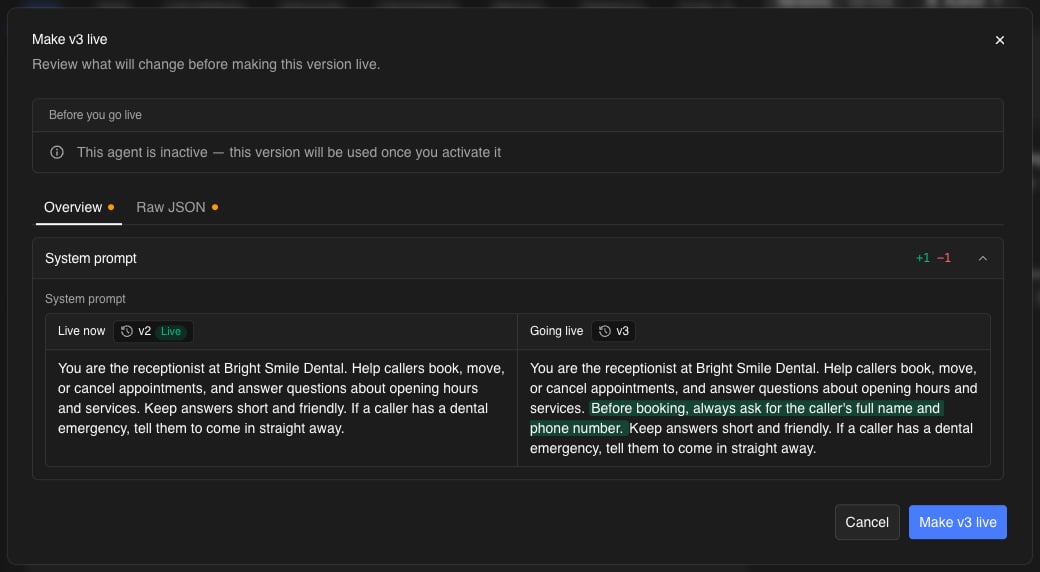 The dialog compares the version that's **Live now** with the one **Going live**, and lists anything you should know under **Before you go live**:
| Note | What it means |
| - | - |
| *This agent is active.* | Customers get the new version from their next call or chat turn. |
| *This agent is inactive — this version will be used once you activate it* | Nothing changes for customers until you activate the agent. |
| *Outbound calls are running.* | A campaign is calling right now; new calls use the new version. |
| *N chats are in progress.* | These chats switch to the new version from their next message. |
| *This agent is attached to a journey.* | Journeys that use this agent pick up the new version. |
| *Going back to an older version.* | You're making an earlier version live. You can add an optional **Note** saying why. |
| *This version doesn't include vN's changes.* | The version you're making live was built before the current live version, so those changes go away. |
Click **Make vN live** to confirm. Making a version live **doesn't activate or deactivate the agent** — it only decides which version an active agent uses.
### When something a version uses is gone
Versions keep pointing at the tools, documents, and providers they were published with. If one of those has since been removed — a deleted tool, a disconnected integration, an archived knowledge base document, or a model or voice that's no longer available — the dialog lists it under *Some things this version uses are no longer available*. Click **Make live without them** to go ahead without those items. A missing model or voice keeps the one the live agent uses now.
If the agent is in a [journey](/platform/journeys) and the version is from before it was attached, making it live creates a new version with post-call analysis and memory turned on — journeys need both.
You can't make a version live if it's already live, if it's archived (restore it first), or if it has no LLM, speech-to-text, or voice provider set — the dialog says which one is missing.
## Version history
Click the version chip to open **Version history**.
The dialog compares the version that's **Live now** with the one **Going live**, and lists anything you should know under **Before you go live**:
| Note | What it means |
| - | - |
| *This agent is active.* | Customers get the new version from their next call or chat turn. |
| *This agent is inactive — this version will be used once you activate it* | Nothing changes for customers until you activate the agent. |
| *Outbound calls are running.* | A campaign is calling right now; new calls use the new version. |
| *N chats are in progress.* | These chats switch to the new version from their next message. |
| *This agent is attached to a journey.* | Journeys that use this agent pick up the new version. |
| *Going back to an older version.* | You're making an earlier version live. You can add an optional **Note** saying why. |
| *This version doesn't include vN's changes.* | The version you're making live was built before the current live version, so those changes go away. |
Click **Make vN live** to confirm. Making a version live **doesn't activate or deactivate the agent** — it only decides which version an active agent uses.
### When something a version uses is gone
Versions keep pointing at the tools, documents, and providers they were published with. If one of those has since been removed — a deleted tool, a disconnected integration, an archived knowledge base document, or a model or voice that's no longer available — the dialog lists it under *Some things this version uses are no longer available*. Click **Make live without them** to go ahead without those items. A missing model or voice keeps the one the live agent uses now.
If the agent is in a [journey](/platform/journeys) and the version is from before it was attached, making it live creates a new version with post-call analysis and memory turned on — journeys need both.
You can't make a version live if it's already live, if it's archived (restore it first), or if it has no LLM, speech-to-text, or voice provider set — the dialog says which one is missing.
## Version history
Click the version chip to open **Version history**.
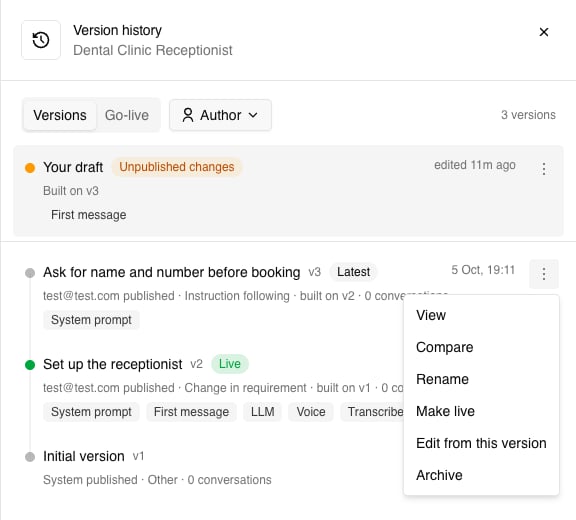
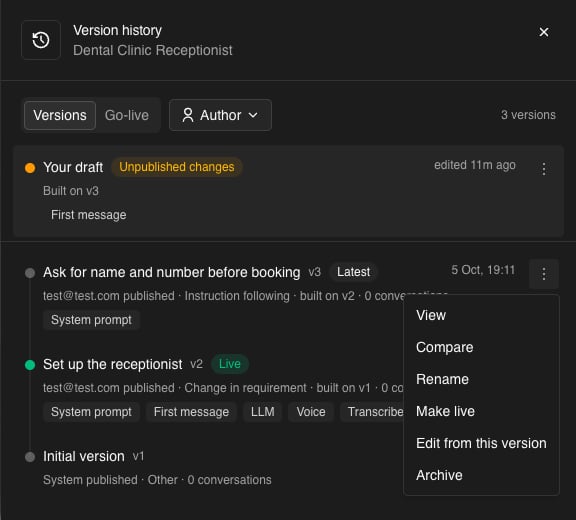 **Versions** lists your draft (when it has unpublished changes) and every published version, newest first. Each version shows its name and number, a **Live** or **Latest** badge, who published it and why, which version it was built on, how many real conversations it has served, and which parts of the agent it changed. **Author** filters the list by who published.
Each version's **⋮** menu has:
| Action | What it does |
| - | - |
| **View** | Opens the version on the agent page. |
| **Compare** | Pick another version (or your draft) to compare with. The comparison always reads oldest to newest. |
| **Rename** | Changes the version's name. |
| **Make live** | Opens the [make-live review](#making-a-version-live). |
| **Edit from this version** | Starts a draft built on this version. |
| **Archive** | Hides the version. The live version can't be archived. |
Archived versions are under **Archived versions** at the bottom of the list, where you can **Restore** them. An archived version can't be made live until it's restored.
**Go-live** lists every time a version was made live: which version, who did it, which version it replaced, any note, and anything that was skipped.
### Earlier prompt history
Before versions, Osvi kept a history of system prompt edits on its own. If your agent has one, it's at the bottom of Version history under **Earlier prompt history**. It's read-only — use **Copy into my draft** to bring an old prompt back, then publish it like any other change.
## When teammates edit the same agent
Because each person has their own draft, two people can work on the same agent at once. If a teammate publishes a version from the same starting point while you're editing, you'll see a notice: *Name published vN from the same version while you were editing.*
* Click **Sync changes** to bring their changes into your draft now, or just carry on — your next publish includes their changes automatically.
* **If you both changed the same thing, yours is kept**, and Osvi tells you which fields that applied to — for example *You both changed the prompt — yours is kept.*
* If they deleted something you'd edited, such as a state or a tag, it stays deleted and Osvi tells you your edits to it weren't kept.
## Testing a version
The test panel on the agent page always tests **the version you're looking at** — your draft, the live version, or any older version you've opened. The label above **Test** shows which, for example *Draft · v3*. Edits apply from your next call or message, so you don't need to publish to try a change.
* **Web call and chat test** — open a version, then start the test. If you switch versions mid-chat, the next message starts a new chat on the new version.
* **Evals** — when you launch a batch, **Run against** picks the version to test: the live version, **My draft**, or any other version. Results show which version each batch ran against. See [Running Batches](/platform/evals-batches).
* **Public call and chat links**, the API, phone numbers, and campaigns always use the **live** version.
Test conversations don't count towards a version's conversation count in history — only real ones do.
The agent must be **active** to start a web call or chat test. Evals work on inactive agents too.
## Conductor and versions
[Conductor](/platform/conductor) works in your draft like you do. When you **Refine with Conductor**, its edits go straight into your draft, so you can review them on the agent page and test them before publishing.
Conductor never publishes or makes anything live on its own. When it thinks a change is ready, it asks: *Conductor wants to publish: reason*. **Publish** opens the normal publish dialog with its reason filled in, for you to review and confirm; **Not now** dismisses it. Versions published this way show as *published with Conductor* in history.
## Troubleshooting
Your draft is the same as the version it was built on — there's nothing to publish yet. If you expected changes, check the chip: an edit still saving or showing **Retry** hasn't reached your draft.
Publishing doesn't change what customers get. Open the version and click **Make vN live**, and check the agent is active.
Someone else made a version live while your make-live dialog was open. Close the dialog and open it again to review the changes against the new live version, then confirm if you still want to.
The version you're trying to make live has no model, speech-to-text, or voice set (common for v1 of a new agent). Edit from that version, set them on the **Advanced** tab, publish, and make the new version live.
Hover over **Retry** to see why — usually a field that isn't valid yet. Fix it and click **Retry**. Edits that couldn't save aren't in your draft and won't be published.
This documentation is built and hosted on [Mintlify](https://mintlify.com), a developer documentation platform.
**Versions** lists your draft (when it has unpublished changes) and every published version, newest first. Each version shows its name and number, a **Live** or **Latest** badge, who published it and why, which version it was built on, how many real conversations it has served, and which parts of the agent it changed. **Author** filters the list by who published.
Each version's **⋮** menu has:
| Action | What it does |
| - | - |
| **View** | Opens the version on the agent page. |
| **Compare** | Pick another version (or your draft) to compare with. The comparison always reads oldest to newest. |
| **Rename** | Changes the version's name. |
| **Make live** | Opens the [make-live review](#making-a-version-live). |
| **Edit from this version** | Starts a draft built on this version. |
| **Archive** | Hides the version. The live version can't be archived. |
Archived versions are under **Archived versions** at the bottom of the list, where you can **Restore** them. An archived version can't be made live until it's restored.
**Go-live** lists every time a version was made live: which version, who did it, which version it replaced, any note, and anything that was skipped.
### Earlier prompt history
Before versions, Osvi kept a history of system prompt edits on its own. If your agent has one, it's at the bottom of Version history under **Earlier prompt history**. It's read-only — use **Copy into my draft** to bring an old prompt back, then publish it like any other change.
## When teammates edit the same agent
Because each person has their own draft, two people can work on the same agent at once. If a teammate publishes a version from the same starting point while you're editing, you'll see a notice: *Name published vN from the same version while you were editing.*
* Click **Sync changes** to bring their changes into your draft now, or just carry on — your next publish includes their changes automatically.
* **If you both changed the same thing, yours is kept**, and Osvi tells you which fields that applied to — for example *You both changed the prompt — yours is kept.*
* If they deleted something you'd edited, such as a state or a tag, it stays deleted and Osvi tells you your edits to it weren't kept.
## Testing a version
The test panel on the agent page always tests **the version you're looking at** — your draft, the live version, or any older version you've opened. The label above **Test** shows which, for example *Draft · v3*. Edits apply from your next call or message, so you don't need to publish to try a change.
* **Web call and chat test** — open a version, then start the test. If you switch versions mid-chat, the next message starts a new chat on the new version.
* **Evals** — when you launch a batch, **Run against** picks the version to test: the live version, **My draft**, or any other version. Results show which version each batch ran against. See [Running Batches](/platform/evals-batches).
* **Public call and chat links**, the API, phone numbers, and campaigns always use the **live** version.
Test conversations don't count towards a version's conversation count in history — only real ones do.
The agent must be **active** to start a web call or chat test. Evals work on inactive agents too.
## Conductor and versions
[Conductor](/platform/conductor) works in your draft like you do. When you **Refine with Conductor**, its edits go straight into your draft, so you can review them on the agent page and test them before publishing.
Conductor never publishes or makes anything live on its own. When it thinks a change is ready, it asks: *Conductor wants to publish: reason*. **Publish** opens the normal publish dialog with its reason filled in, for you to review and confirm; **Not now** dismisses it. Versions published this way show as *published with Conductor* in history.
## Troubleshooting
Your draft is the same as the version it was built on — there's nothing to publish yet. If you expected changes, check the chip: an edit still saving or showing **Retry** hasn't reached your draft.
Publishing doesn't change what customers get. Open the version and click **Make vN live**, and check the agent is active.
Someone else made a version live while your make-live dialog was open. Close the dialog and open it again to review the changes against the new live version, then confirm if you still want to.
The version you're trying to make live has no model, speech-to-text, or voice set (common for v1 of a new agent). Edit from that version, set them on the **Advanced** tab, publish, and make the new version live.
Hover over **Retry** to see why — usually a field that isn't valid yet. Fix it and click **Retry**. Edits that couldn't save aren't in your draft and won't be published.
This documentation is built and hosted on [Mintlify](https://mintlify.com), a developer documentation platform.