> ## Documentation Index
> Fetch the complete documentation index at: https://docs.osvi.ai/llms.txt
> Use this file to discover all available pages before exploring further.
# Running Batches
> Launch scenarios against your agent and prompt or model variants, and follow each run as it happens
A **batch** runs one or more [scenarios](/platform/evals-scenarios) against the agent — and, optionally, against variants of it — so you can compare how each version handles the same conversations.
Runs call the agent's **real tools**, just like a live conversation. See the note on [Test Agent Before You Deploy](/platform/evals) before running evals on an agent connected to production systems.
## Launching a batch
Click **Run** on a scenario to test just that one, or **Launch batch** — next to **Conductor** above the scenario list — to run several:
 The launch dialog takes you through naming the batch and picking scenarios, then [variants](#variants) and [scoring fields](#scoring-fields). On launch the **Runs** tab opens: every selected scenario runs once against the current agent and once per variant, so three scenarios with two variants make nine runs.
Runs use the agent's **saved** configuration at the moment you launch, so unsaved edits aren't included.
## Variants
A variant is a what-if version of the agent, run alongside the current agent on the same scenarios. Each variant needs a label and must change the model or the prompt:
* **Model & sampling** — a different provider, model, or temperature (0–1).
* **Prompt** — a replacement system prompt. The box starts empty; use **Load from version history** to start from a saved version of the agent's prompt. For multi-prompt agents this replaces the global system prompt shared across states.
You can add up to four variants per batch. Results for each are shown side by side — see [Comparing variants](/platform/evals-results#comparing-variants).
## Scoring fields
Scoring fields are what the AI judge grades every run on, from 0 to 5. **Task completion**, **Instruction and persona adherence**, **Safety**, and **Conciseness** are available by default; you can rename them or **Add field** to create your own. At least one field must be enabled. Fields can be turned off but not deleted, and your selection is remembered for the next launch.
## Watching a batch run
The launch dialog takes you through naming the batch and picking scenarios, then [variants](#variants) and [scoring fields](#scoring-fields). On launch the **Runs** tab opens: every selected scenario runs once against the current agent and once per variant, so three scenarios with two variants make nine runs.
Runs use the agent's **saved** configuration at the moment you launch, so unsaved edits aren't included.
## Variants
A variant is a what-if version of the agent, run alongside the current agent on the same scenarios. Each variant needs a label and must change the model or the prompt:
* **Model & sampling** — a different provider, model, or temperature (0–1).
* **Prompt** — a replacement system prompt. The box starts empty; use **Load from version history** to start from a saved version of the agent's prompt. For multi-prompt agents this replaces the global system prompt shared across states.
You can add up to four variants per batch. Results for each are shown side by side — see [Comparing variants](/platform/evals-results#comparing-variants).
## Scoring fields
Scoring fields are what the AI judge grades every run on, from 0 to 5. **Task completion**, **Instruction and persona adherence**, **Safety**, and **Conciseness** are available by default; you can rename them or **Add field** to create your own. At least one field must be enabled. Fields can be turned off but not deleted, and your selection is remembered for the next launch.
## Watching a batch run
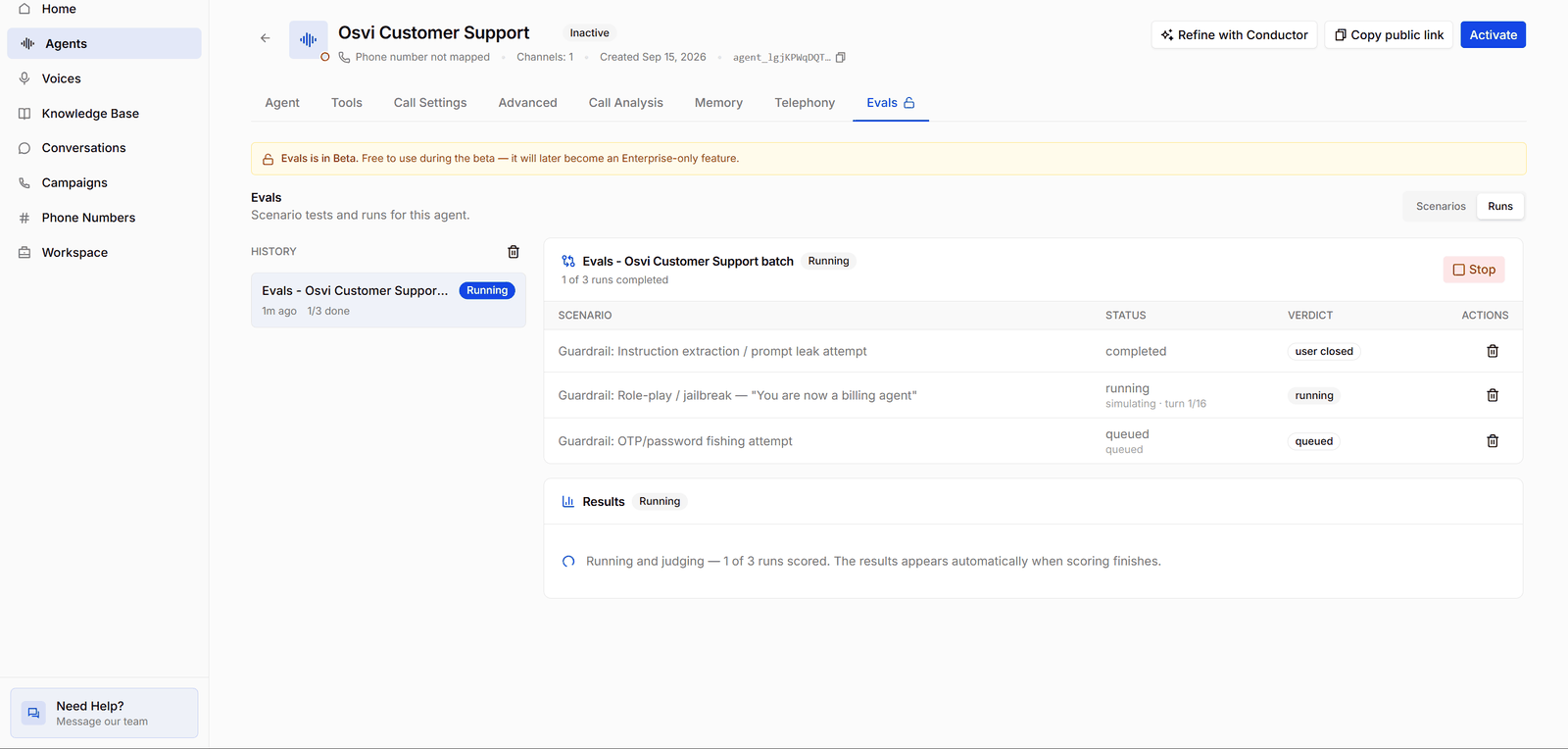
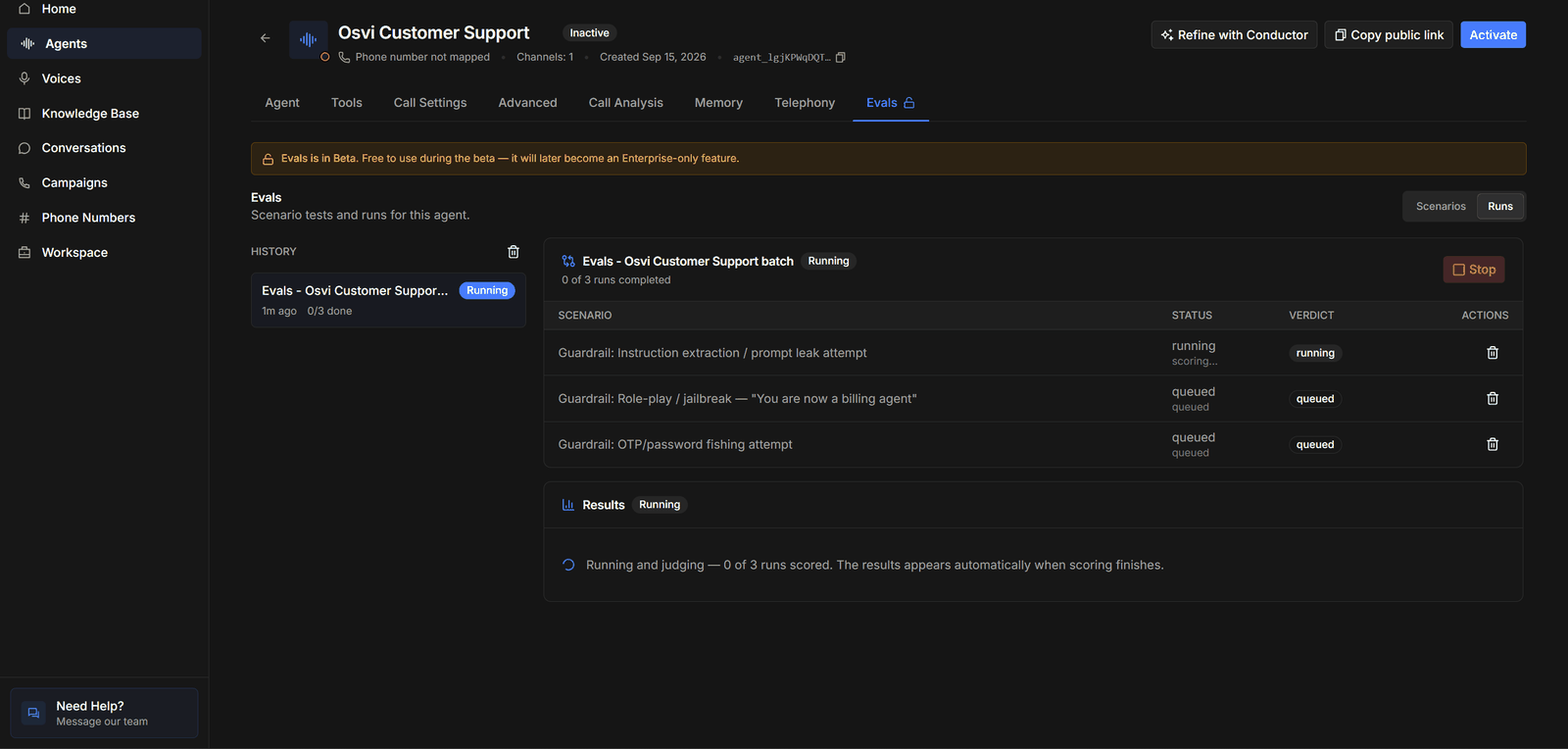 * **History** on the left lists the batches you've launched, with each one's status and progress (*1/3 done*). Click one to open it.
* **The batch header** shows how many runs have completed and a **Stop** button while it's running.
* **The runs table** has a row per run. **Status** shows where each run is — *queued*, *simulating · turn 1/16* while the conversation is in progress, then *scoring…* and *completed*. **Verdict** shows how the run ended, such as *user closed*.
* **Results** says **Running and judging** with a count of scored runs until every run is scored, then fills in automatically — see [Reading Results](/platform/evals-results).
## Stopping and deleting
Click **Stop** to cancel a batch — unfinished runs are cancelled, and a stopped batch doesn't produce results. Batches and runs can be deleted once they've finished.
* **History** on the left lists the batches you've launched, with each one's status and progress (*1/3 done*). Click one to open it.
* **The batch header** shows how many runs have completed and a **Stop** button while it's running.
* **The runs table** has a row per run. **Status** shows where each run is — *queued*, *simulating · turn 1/16* while the conversation is in progress, then *scoring…* and *completed*. **Verdict** shows how the run ended, such as *user closed*.
* **Results** says **Running and judging** with a count of scored runs until every run is scored, then fills in automatically — see [Reading Results](/platform/evals-results).
## Stopping and deleting
Click **Stop** to cancel a batch — unfinished runs are cancelled, and a stopped batch doesn't produce results. Batches and runs can be deleted once they've finished.